Written by Nouman Zulfiqar BSc Dental Technology — Lead Dental Technician, Classic Dental Lab, Folkestone, Kent
Choosing the right dental laboratory is only the beginning. Once a dental practice has a case ready, the next question is often:
How do I send my dental case to the laboratory?
At Classic Dental Lab, based in Folkestone, Kent, we support both digital and traditional dental laboratory workflows for NHS and private dental practices across the UK.
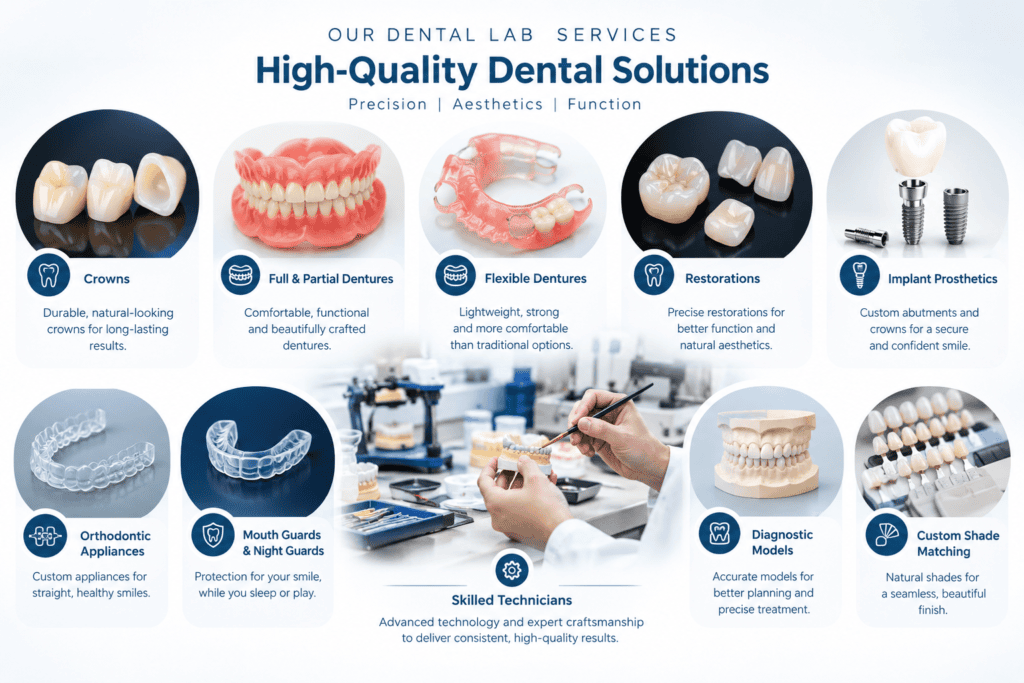
Depending on the case, practices can send digital impressions, STL files, physical impressions and laboratory prescriptions. We support digital workflows with major intraoral scanning systems, including 3Shape TRIOS, Medit and iTero. Our current website also provides connection guidance for several additional scanner platforms.
This guide explains how to prepare and send a dental case to Classic Dental Lab and what information can help the laboratory process the case efficiently.
Quick answer: How do I send a dental case to Classic Dental Lab?
You can send a case to Classic Dental Lab through several routes:
- Digital scanner submission
- STL file submission
- Courier or postal delivery of physical cases
- In-person drop-off at the Folkestone laboratory
For digital cases, the practice can connect its compatible scanner or digital workflow to Classic Dental Lab and send the case electronically. For analogue cases, the appropriate laboratory docket and physical impressions or appliances can be sent by courier/post.
The exact information required depends on the type of restoration being requested.
1. Prepare the dental case before sending it
Before submitting a case, make sure the laboratory has enough information to understand what needs to be manufactured.
A good laboratory prescription should clearly communicate the requested restoration and any relevant instructions.
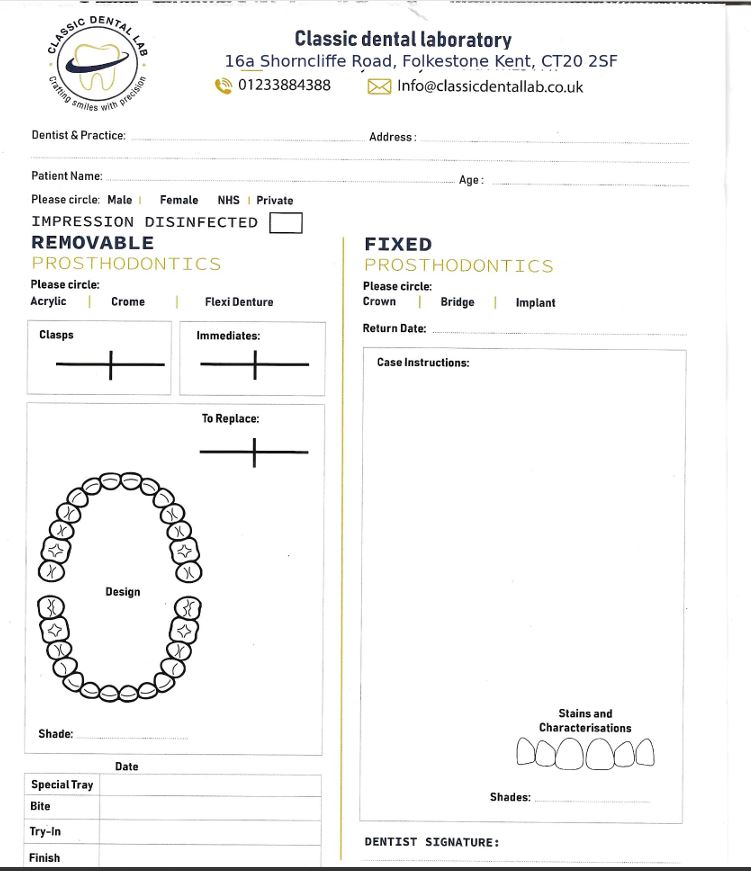
Depending on the case, this may include:
- Patient identifier
- Dentist or clinician details
- Practice details
- Restoration required
- Tooth/teeth numbers
- Material requested
- Shade
- Preparation information
- Occlusal requirements
- Implant system and components, where applicable
- Digital scan information
- Bite registration
- Opposing arch
- Photographs, where relevant
- Special instructions
- Required date, where applicable
The GDC states that dental records should be complete, accurate and clear, and specifically identifies laboratory prescriptions as part of patient records where available.
Why does the prescription matter?
A laboratory technician should not have to guess what the clinician wants.
For example, a prescription saying:
“Crown – upper right”
may not provide enough information for a complex case.
A more useful prescription should identify the relevant tooth, restoration type, material, shade and other instructions required for that particular case.
Clear instructions can reduce unnecessary communication and help the laboratory understand the intended outcome.
2. Sending digital dental cases to Classic Dental Lab
Digital dentistry can make case communication between a dental practice and laboratory much more efficient.
Instead of sending a physical impression, the practice can capture an intraoral scan and transfer the digital case to the laboratory.
Classic Dental Lab accepts digital impressions from major systems including:
- 3Shape TRIOS
- Medit
- iTero
The laboratory also lists digital connection options for systems including Dentsply Sirona, Panda, Aoralscan, Carestream, Aidite, Fussen, Dexis and Ivoclar Digital.
The exact connection procedure depends on the scanner platform.
3. How to send a case from 3Shape TRIOS
For practices using 3Shape TRIOS, Classic Dental Lab’s current instructions are:
- Open the 3Shape Communicate portal.
- Navigate to the Connections section.
- Select Add Connection.
- Search for Classic Dental Lab.
- Send the connection request.
- Once the laboratory approves the connection, select Classic Dental Lab when sending future cases.
The laboratory states that connection approval is normally handled within 24 hours.
Before sending the scan
Check that the digital prescription contains the relevant case information and that the correct patient/case has been selected.
This simple check is particularly important when multiple cases are being sent from a busy dental practice.
4. How to send a case from Medit
For practices using Medit, the current Classic Dental Lab workflow is:
- Log in to Medit Link.
- Open the Partners section.
- Search for Classic Dental Lab.
- Send a partnership request.
- Once the connection is confirmed, Classic Dental Lab can be selected when submitting cases.
After the partnership has been established, the process can become part of the practice’s normal digital workflow.
5. How to send a case from iTero
For iTero users, Classic Dental Lab currently advises practices to:
- Open the iTero scanner workflow.
- Select Add a new lab.
- Search for Classic Dental Lab.
- Add the laboratory to the preferred laboratory list.
- Select Classic Dental Lab when sending the case.
If the laboratory does not appear in the scanner’s available laboratory list, the practice should contact Classic Dental Lab for assistance rather than sending the case to an incorrect recipient.
6. What if you already have an STL file?
If your practice has exported an STL file, digital case submission may still be possible.
STL files can contain the 3D geometry of scanned dental structures and can be used within appropriate digital laboratory workflows.
However, an STL file by itself may not contain all the information the laboratory needs.
For example, a crown case may require:
- Preparation scan
- Opposing arch
- Bite
- Tooth number
- Restoration type
- Material
- Shade
- Laboratory prescription
An implant case may additionally require:
- Implant manufacturer/system
- Implant positions
- Scan-body information
- Restoration type
- Required implant components
- Relevant clinical instructions
Therefore, sending only an STL file without a clear prescription may result in the laboratory needing to contact the practice for additional information.
7. Sending physical impressions and traditional cases
Not every dental case needs to be completely digital.
Classic Dental Lab also supports traditional laboratory workflows.
For physical cases, the practice can prepare the appropriate laboratory docket and send the case using courier or post. Classic Dental Lab also provides an in-person drop-off option at its Folkestone location.
When sending a physical impression, the practice should ensure that:
- The impression is properly identified.
- The laboratory prescription is included.
- The relevant patient identifier is present.
- The required restoration is clearly specified.
- The impression is packaged appropriately.
- Any opposing model/impression is included where required.
- The bite registration is included where necessary.
- The case is securely packaged for transportation.
8. What information should be included with a crown case?
For a routine crown case, the laboratory may need information such as:
Case details
- Patient identifier
- Practice
- Dentist
- Tooth number
Restoration
- Crown
- Material
- Shade
- Required design
Records
- Preparation scan/impression
- Opposing arch
- Bite registration
Additional information
- Existing restoration information
- Photographs, if relevant
- Special aesthetic requirements
- Due date or requested delivery date
At Classic Dental Lab, the stated standard turnaround for crowns and bridges is 5–7 working days, although the actual timeframe can vary according to case requirements.
9. How to send implant cases
Implant cases require additional attention because the laboratory needs accurate information about the implant system and intended restoration.
For an implant case, provide the laboratory with the information applicable to the prescribed restoration, such as:
- Implant manufacturer
- Implant system
- Implant positions
- Scan-body details
- Abutment requirements
- Screw-retained or other prescribed restoration design
- Digital scans
- Opposing arch
- Bite
- Shade
- Aesthetic instructions
- Relevant photographs
For All-on-4, All-on-6 and other full-arch implant restorations, additional records and communication may be required because these cases involve multiple implant interfaces and a more complex restorative workflow.
If information is missing, the laboratory should clarify the prescription before proceeding rather than making assumptions.
This approach is consistent with the GDC’s guidance that dental professionals should work effectively with colleagues and be clear about what is being requested.
10. What about dentures?
Classic Dental Lab provides several denture options, including:
- Acrylic dentures
- Chrome dentures
- Flexi dentures
- Digital dentures
The information required can vary according to the denture type and stage of treatment.
Depending on the case, the laboratory may require:
- Impressions or digital records
- Bite registration
- Existing denture
- Tooth shade
- Tooth mould/shape preferences
- Aesthetic instructions
- Patient-specific requirements
- Laboratory prescription
For complex cases, good communication between the dentist and laboratory is especially important.
11. How to send digital impressions securely
Dental practices should treat digital dental records as confidential patient information.
The GDC states that patient information must be kept confidential and secure. It also advises that confidential information sent electronically should use an appropriate secure method and encryption where applicable.
This means practices should avoid casually sending identifiable clinical information through unsecured channels when a secure laboratory/scanner workflow is available.
Best practice
Use:
Scanner → secure laboratory connection → laboratory workflow
rather than:
Scanner → downloaded files → random file-sharing service → laboratory
The safest method depends on the software, scanner and practice systems being used.
12. What happens after Classic Dental Lab receives the case?
Once a case arrives, the laboratory workflow may involve:
Case received
↓
Prescription and records checked
↓
Digital files/impressions assessed
↓
Missing information clarified if required
↓
Case entered into laboratory workflow
↓
CAD/design or technical preparation
↓
Manufacturing
↓
Quality control
↓
Finishing and inspection
↓
Dispatch or collection
The exact workflow depends on the restoration.
For example, a zirconia crown and a full-arch implant restoration will naturally require different laboratory processes.
13. How long does a dental case take?
There is no single turnaround time for every dental restoration.
Classic Dental Lab currently lists:
| Case type | Stated turnaround |
|---|---|
| Crowns & bridges | 5–7 working days |
| Dentures | 7–10 working days |
| Implant cases | 7–12 working days |
The laboratory also states that rush services may be available on request.
These should be treated as general stated turnaround times, not a guarantee for every case. Complex cases, missing information, additional design stages or required try-ins can affect the final delivery date.
For an urgent case, contact the laboratory before sending it so the expected timeframe can be confirmed.
14. Common mistakes when sending dental cases
A few simple mistakes can create avoidable delays.
❌ Missing tooth number
The laboratory may not know which tooth is being restored.
❌ No shade information
This can delay aesthetic cases.
❌ Missing opposing arch
Some restorations require opposing information for proper design and occlusal assessment.
❌ Missing bite registration
Where a bite record is required, omitting it can prevent the laboratory from progressing.
❌ Incorrect implant information
This is particularly important for implant restorations.
❌ Sending an STL without a prescription
The digital geometry alone may not communicate the complete restoration requirements.
❌ Incorrect patient identification
Always verify the case before submitting it.
❌ Unclear instructions
If something is important to the final restoration, write it clearly in the prescription.
Dental Case Submission Checklist
Before clicking Send, use this quick checklist:
Digital case
☐ Correct patient/case selected
☐ Preparation scan included
☐ Opposing arch included
☐ Bite included where required
☐ Correct laboratory selected
☐ Prescription completed
☐ Tooth number confirmed
☐ Material selected
☐ Shade selected
☐ Implant information included where applicable
☐ Special instructions added
Physical case
☐ Laboratory docket completed
☐ Patient identifier included
☐ Impression/model correctly packaged
☐ Opposing impression/model included if required
☐ Bite registration included where required
☐ Prescription clearly completed
☐ Correct delivery/collection arrangement confirmed
Why choose Classic Dental Lab for UK dental cases?
Classic Dental Lab is based in Folkestone, Kent, and works with NHS and private dental practices across the UK.
The laboratory combines traditional laboratory craftsmanship with digital dental technology and provides a range of restorations including:
- Zirconia crowns
- PFM bridges
- Acrylic dentures
- Chrome dentures
- Flexi dentures
- Digital dentures
- Implant restorations
- All-on-4 and All-on-6 restorations
- Veneers
- Night guards
- Sports mouthguards
Digital impressions are accepted from major systems including 3Shape TRIOS, iTero and Medit.
For practices using digital dentistry, the ability to connect directly through the appropriate scanner ecosystem can make case submission simpler and reduce unnecessary file handling.
Frequently Asked Questions
How can I send a dental case to Classic Dental Lab?
Classic Dental Lab accepts digital cases, STL files and traditional physical cases. Digital cases can be submitted through compatible scanner connections, while physical cases can be sent by courier/post or dropped off at the Folkestone laboratory.
Does Classic Dental Lab accept 3Shape TRIOS scans?
Yes. Classic Dental Lab provides instructions for connecting 3Shape TRIOS to the laboratory through 3Shape Communicate.
Can I send Medit cases to Classic Dental Lab?
Yes. Practices can request a partnership with Classic Dental Lab through Medit Link.
Does Classic Dental Lab accept iTero scans?
Yes. Classic Dental Lab lists iTero among its supported digital impression workflows.
Can I send an STL file to the dental laboratory?
Yes, Classic Dental Lab states that digital cases can be submitted using STL files. However, the STL should be accompanied by the relevant case prescription and supporting records required for the restoration.
Can I send physical impressions?
Yes. Classic Dental Lab supports traditional case submission through courier/post and provides a laboratory docket for analogue impressions.
How long does Classic Dental Lab take?
The laboratory currently states 5–7 working days for crowns and bridges, 7–10 working days for dentures and 7–12 working days for implant cases. Actual turnaround depends on the individual case.
Where is Classic Dental Lab located?
Classic Dental Lab is located at 16A Shorncliffe Road, Folkestone, Kent, CT20 2SF and provides laboratory services to dental practices across the UK.
Final Takeaway
Sending a dental case to a laboratory does not have to be complicated.
Whether your practice uses 3Shape TRIOS, Medit, iTero or another compatible digital workflow, the most important principle is simple:
Send the laboratory the right records, the right prescription and the right instructions.
For physical cases, make sure the impression, laboratory docket and supporting records are properly prepared and securely packaged.
For digital cases, check the patient, prescription, scan quality, opposing arch, bite and restoration requirements before submitting.
At Classic Dental Lab, our aim is to make the laboratory side of your workflow straightforward, whether you are sending a single crown, denture, bridge or a complex implant restoration.
Classic Dental Lab — Folkestone, Kent — supporting UK dental practices with digital and traditional dental laboratory workflows.
About the author: This article was written by Nouman Zulfiqar BSc Dental Technology, Lead Dental Technician and founder of Classic Dental Lab — an MHRA-registered dental laboratory based in Folkestone, Kent, serving NHS and private dental practices across Kent and the UK. Company Registration No: 16927633